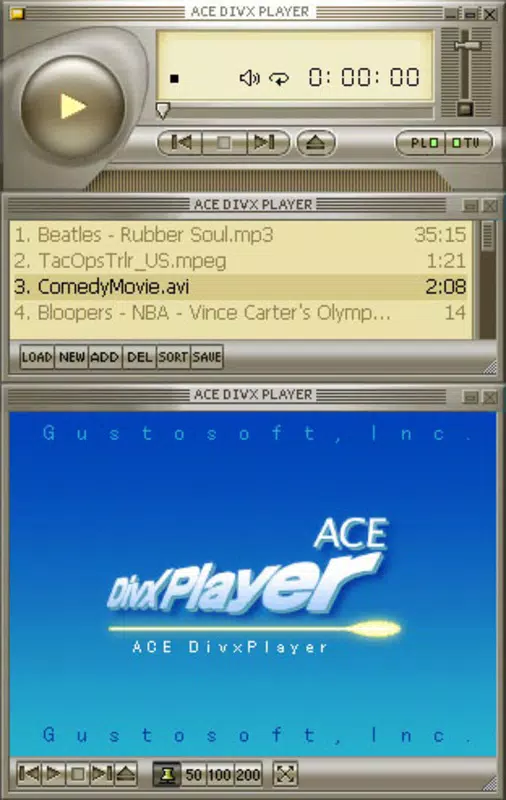

Download Ace DivX Player – DivX player, video player, media player, lightweight, fast playback, AVI, MPG, MP3, ASF, Audio CD, Video-CD
Overview
Ace DivX Player is a mobile application designed to deliver a streamlined and efficient media playback experience, primarily focused on DivX files. As a lightweight utility, it caters to users who require a no-frills solution for playing video and audio content without the overhead of complex features or resource-heavy interfaces. The app is particularly suited for individuals managing older or legacy media formats, such as AVI, MPG, MP3, ASF, Audio CD, and Video-CD, which are still widely used in personal archives and home media libraries.
By concentrating on core playback functionality, Ace DivX Player solves the common problem of format incompatibility on mobile devices, offering a reliable tool for users who need quick access to their stored media. Its minimal design philosophy makes it ideal for users seeking simplicity, especially those who may be less tech-savvy or prefer a distraction-free viewing environment. The app’s focus on speed and efficiency suggests it is optimized for devices with limited processing power or memory, making it a practical choice for older smartphones or budget Android devices.
Although the developer did not provide additional technical details about the app’s architecture or background, its long-standing presence in the Android ecosystem since its release in 2012 indicates a level of stability and user trust. For users maintaining digital collections of older media formats, Ace DivX Player remains a functional and accessible option. Its continued relevance highlights the ongoing need for compact, reliable media tools in the broader mobile app ecosystem.
Key Features & Functionality
- Lightweight Design: At just 1.4 MB, Ace DivX Player is engineered to minimize system resource usage. This makes it ideal for older or low-spec Android devices where storage and memory are limited, ensuring smooth operation without affecting overall device performance.
- Wide Format Support: The app supports a range of legacy and commonly used media formats, including DivX, AVI, MPG, MP3, ASF, Audio CD, and Video-CD. This broad compatibility allows users to play diverse media files without needing to convert or transcode them first.
- Fast Playback: Optimized for speed, Ace DivX Player enables rapid loading and seamless playback of video files. Users can expect minimal startup delay and consistent frame rates, which is essential for uninterrupted viewing of high-quality or long-form content.
- Simple Interface: The user interface is intentionally minimal, focusing on essential playback controls such as play, pause, stop, and volume adjustment. This straightforward layout reduces learning curves and allows users to start playing media with minimal effort.
- No Frills Approach: By excluding advanced settings, skins, or customizable options, the app maintains a clean and predictable experience. This design choice benefits users who prioritize reliability and speed over personalization or feature-rich environments.
For example, a user with a collection of home videos stored in AVI format can install Ace DivX Player and begin playback immediately, without configuring codecs or adjusting settings. Similarly, someone with music files in MP3 or Audio CD format can use the app to listen to their library on the go, leveraging its efficient decoding engine.
Interface, UX & Performance
The interface of Ace DivX Player is designed with functionality over form, presenting a basic layout that prioritizes ease of access to core playback features. The screen layout is uncluttered, with essential controls positioned for intuitive use. Navigation is straightforward: users open the app, select a media file from their device’s storage, and playback begins with minimal interaction.
Although the developer did not list formal performance metrics, the app’s lightweight nature and long-standing presence suggest it operates reliably across a range of Android devices. It is expected to perform consistently on entry-level and mid-range smartphones, particularly those running older versions of Android. The app’s small file size contributes to faster load times and reduced memory consumption, which enhances overall responsiveness during playback.
Stability appears to be a strength, as the app has remained available and functional since its 2012 release. However, compatibility with newer Android versions may be limited, as no information was provided about required OS versions. Users should be cautious when installing on modern devices, as older apps may not support current security protocols or system APIs. Despite this, the app’s simplicity and minimal resource usage make it a viable option for users who value basic functionality over modern enhancements.
Platform Compatibility & Technical Requirements
Ace DivX Player is available exclusively on the Android platform. The app has a file size of 1.4 MB, making it suitable for devices with limited storage capacity. It is currently available in version 1.0.1, indicating a stable, mature release with no recent updates since its initial launch.
The developer did not specify minimum OS requirements or compatibility details for newer Android versions. As such, users are advised to test the app on their device before relying on it for regular use. While it may function on older Android systems, its performance on devices running Android 10 or later is uncertain due to potential API incompatibilities.
Given its small footprint and minimal dependencies, Ace DivX Player is likely compatible with a wide range of Android devices, including low-end smartphones and tablets. However, users should verify that their device supports APK installations and that the app is not blocked by system restrictions.
Pros and Cons
Pros
- Extremely lightweight at only 1.4 MB
- Supports multiple legacy media formats including AVI, MPG, MP3, and DivX
- Fast playback with minimal startup delay
- Simple, intuitive interface suitable for all user levels
- Free to download and use with no in-app purchases
Cons
- No recent updates since 2012, raising compatibility concerns with modern Android systems
- Limited to basic playback functions with no advanced settings or customization
- Developer did not provide information on required OS version or compatibility
- May not support newer file formats or hardware acceleration features
- No support for subtitles or external audio tracks
FAQ
Is Ace DivX Player safe to download?
Yes, the app is free and available through trusted Android distribution channels. However, users should ensure they download from official sources to avoid modified or malicious versions.
Can I use Ace DivX Player on Android 12 or later?
The developer did not specify compatibility with newer Android versions. While the app may function on some devices, performance and security may be affected due to outdated code.
Does Ace DivX Player support subtitles?
Based on the available information, the app does not support external subtitle files or embedded subtitle tracks.
Is Ace DivX Player free to use?
Yes, the app is completely free to download and use, with no in-app purchases or ads reported.
Can I install Ace DivX Player on iOS?
Currently, the app is only available for Android. There is no official iOS version or release planned.
Final Thoughts
Ace DivX Player remains a niche but functional tool for users who need a reliable, lightweight media player for legacy formats. Its ability to handle AVI, DivX, MPG, MP3, and other older file types makes it a valuable utility for those maintaining personal media libraries. While its lack of updates and modern features limits its appeal to mainstream users, it offers a stable, no-nonsense experience for individuals who prioritize speed and simplicity.
For users with older Android devices or those who frequently access archived video and audio files, Ace DivX Player delivers consistent performance without bloat. Its minimal design and free access make it a practical choice for specific use cases where advanced features are unnecessary.
Download Ace DivX Player now


